



4.12 Programming Project #1 –
Taxes
Background
This will be your first programming project in C++. Although most of the basic
programming concepts are the same as those you should already be familiar with, you
will have some syntax and structure differences to work through as you begin to
develop programs using C++. This first programming assignment will give you a gentle
introduction to programming in C++.
Objectives
At the completion of this project, you will have created an application that properly
uses C++ syntax and structure. In particular, this project:
• introduces students to the style and structure of a C++ program
• uses the standard C++ I/O library to get input from the console,
• uses arithmetic expressions, assignment, and control structures; and
• uses the standard C++ I/O library to format output and send it to the console
Introduction
Suppose that your Utah state tax is computed using the following tables (Note all
income amounts are in whole dollars):
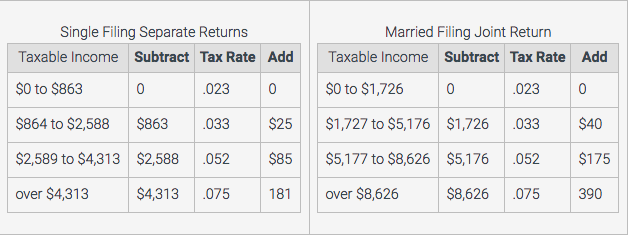
For example, if a married person who earns $5000.00 a year files a joint return the
formula to calculate this person’s taxes would be:
tax = (5000 – 1726) * 0.033 + 40.0
Project
For this project, you should write a program that does the following:
1. Prompt the user to enter in their taxable income.
2. Get the input. Validate the input to insure that it is a positive value. You may
assume that a numerical value is entered.
3. Prompt the user to enter in “s” or “m” for filing single or jointly.
4. Get the input and validate that it is either “s” or “m”. Re-do this step if the input is
not valid.
5. Based on the user’s input, calculate the user’s tax using the appropriate tax
table and display the amount of money that person owes. Present this data
nicely formatted.
6. Ask the user if they want to do another tax calculation.
7. Accept either ‘y’, ‘n’, or ‘q’ as input. Validate the input and re-do this step if it is
not correct.
8. If the user selects ‘y’ start back at step one. If the user selects ‘q’, quit. For all
other choices, tell the user that an invalid choice was made and ask them to
input again.
For this program, you can enter your code directly in Zylabs while you are developing
it. When you are ready to submit your program, click on the Submit button. If you use
another development environment, you can paste your code into the main.cpp text
box in Develop mode, and then click on Submit. (The latter mode is recommended.)
Note: Your code must be portable, meaning it must run on any C++ compiler. Do not
use any platform-specific code.
Input and Output in Zylabs
Running a console program in Zylabs is different than in a terminal window on your
computer. A sample execution in a terminal window would look something like the
following.
Please enter in your taxable income.
(This must be a positive value): 10000
Please enter m if married and filing joint return,
or s if filing a single return: m
Your taxable income is $10000.00
and you are filing a joint return.
Your income tax will be $493.05
Would you like to do another calculation (y or n)?n
When running this in Develop Mode in Zylabs, you enter each input on its own line in
the input window. For this sample, you would enter the following in the input window:
10000
m
n
Zylabs automatically feeds each data item into each input request from your program.
It is important that you do not wait for the user to press Enter/Return (don’t
use cin.get() or anything like it in the code you submit to Zylabs).
In the expected output window, you place everything except the input, which in this
case is:
Please enter in your taxable income.
(This must be a positive value):
Please enter m if married and filing joint return,
or s if filing a single return:
Your taxable income is $10000.00
and you are filing a joint return.
Your income tax will be $493.05
Would you like to do another calculation (y or n)?
The same output as seen in the console sample above will then appear in the
execution output window in Zylabs.
When you enter Submit Mode and click Submit, your program will be run against test
cases that have been prepared by your instructors. You will be able to see the results
and resubmit if needed. Make sure you submit your finished solution by the due date
and time. All entries are time-stamped by Zybooks and late projects will be docked
according to the syllabus.

